Technical Deep Dive: What Are Blockchain Indexers? How To Build One with Envio
Some dApps show your transaction history, filter by token, and display trading volume instantly. Others hang for seconds or fail entirely.
The difference is indexing.
If you're building onchain, you'll eventually hit this wall: your smart contract works perfectly, events are firing, but your frontend can't display the data users actually need. You try querying the blockchain directly and quickly realize it's painfully slow, hits rate limits, and can't handle basic operations like filtering or sorting.
That's because blockchains aren't databases. They're not built for queries. They're append-only ledgers optimized for consensus and immutability, not for answering questions like "show me all active loans" or "what's the total trading volume."
To build a real dApp with a responsive frontend, you need something in between: an indexer.
This post covers what indexing actually is, why direct RPC queries don't scale, how WebSockets keep data real-time, and how to build an indexer with Envio (and how it compares to The Graph).
Table of Contents
- The Use Case: Real-Time Intent Display for a P2P Lending Protocol
- The Problem: Blockchains Aren't Databases
- What Is a Blockchain Indexer?
- The Graph vs Envio
- Building the Indexer
- The Full Stack
- Refactoring: When EventHandlers.ts Hits 2000+ Lines
- Real-Time Updates: WebSockets
- The Gotcha: No Aggregates on Hosted Envio
- Why Compute Status Early?
- When You Need an Indexer
- Takeaways
The Use Case: Real-Time Intent Display for a P2P Lending Protocol
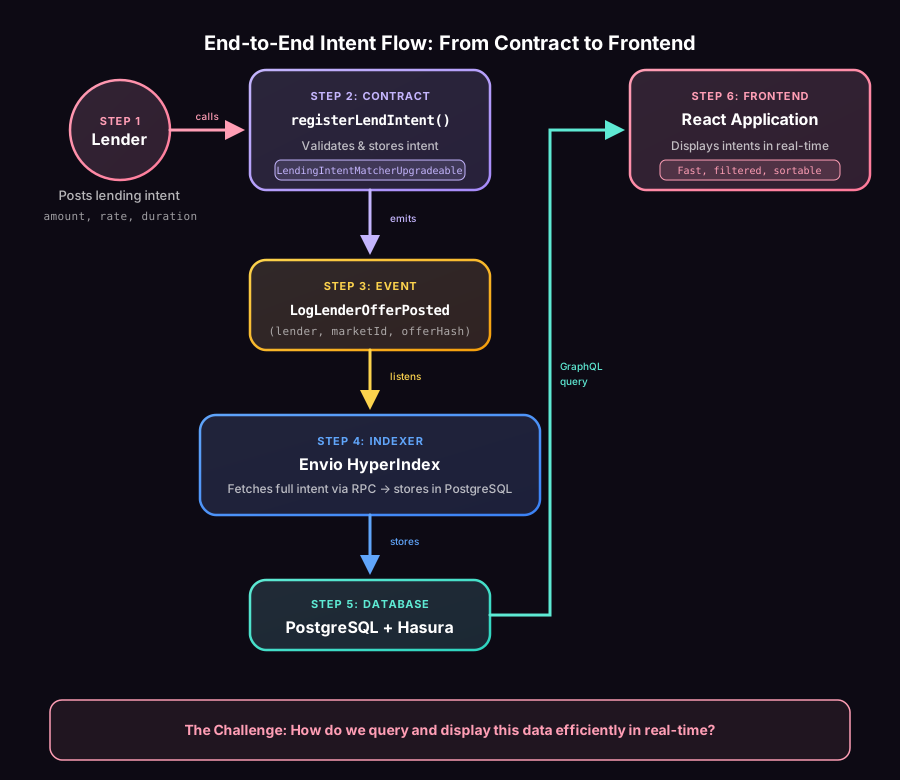
To understand the indexing problem better, let's look at a real use case. At Floe Labs, we're building an AI-native P2P intent-based lending protocol.
Here's how it works:
Lenders post lending intents with their terms: "I'll lend 1000 USDC at 5% APY for 30 days, max 80% LTV." Borrowers post borrowing intents with their needs: "I need 800 USDC, offering ETH as collateral, willing to pay 6% APY for 30 days." A matcher algorithm (could be anyone) pairs compatible intents and creates loans onchain.
The Players
The protocol has three types of actors that all need real-time data:
- Web app - Users browse intents, post new ones, monitor their loans
- Solver bot - Watches for new intents, finds matches, executes them onchain for a fee
- Liquidation bot - Monitors active loans, liquidates any that become undercollateralized
All three need the same thing: fast, real-time access to protocol state. That's what the indexer provides.
When a lender posts an intent, they call the registerLendIntent() function in our smart contract:
// In LendingIntentMatcherUpgradeable.sol
function registerLendIntent(LendIntent calldata intent) external {
    // Validates intent parameters (amount, rate, duration, expiry)
    // Stores intent onchain
    // Emits event for tracking
}
The contract emits an event when an intent is posted:
event LogLenderOfferPosted(
    address indexed lender,
    bytes32 indexed marketId,
    bytes32 offerHash
);
The Challenge: Real-Time Display
Here's the problem: How do you display all active lending intents in the frontend in real-time?
You need to show users:
- All open lending intents for a specific market
- Filter by interest rate, amount, duration
- Sort by best rates
- Update instantly when new intents are posted
- Show which intents are matched, cancelled, or expired
The Problem: Blockchains Aren't Databases
The naive approach? Query the RPC for events, then fetch each intent's full details:
// Step 1: Fetch all LogLenderOfferPosted events
const lenderOfferEvents = await client.getLogs({
  address: LENDING_CONTRACT_ADDRESS,
  event: parseAbiItem('event LogLenderOfferPosted(address indexed lender, bytes32 indexed marketId, bytes32 offerHash)'),
  fromBlock: 40499040n,
  toBlock: 'latest'
});

// Step 2: For each event, fetch the full intent details
const lendIntents = await Promise.all(
  lenderOfferEvents.map(async (event) => {
    // Each intent requires another RPC call to get full data
    const intentDetails = await client.readContract({
      address: LENDING_CONTRACT_ADDRESS,
      abi: contractABI,
      functionName: 'getOnChainLendIntent',
      args: [event.args.offerHash]
    });

    return {
      offerHash: event.args.offerHash,
      lender: event.args.lender,
      marketId: event.args.marketId,
      amount: intentDetails.amount,
      minInterestRateBps: intentDetails.minInterestRateBps,
      duration: intentDetails.duration,
      expiry: intentDetails.expiry,
      // ... more fields
    };
  })
);

// Step 3: Filter and sort client-side
const activeIntents = lendIntents
  .filter(intent => intent.expiry > Date.now() / 1000)
  .sort((a, b) => Number(a.minInterestRateBps - b.minInterestRateBps));
This works for a few hundred events. But the problems stack up fast:
- Slow - Scanning thousands of blocks takes minutes, not seconds
- Expensive - Each intent requires an additional RPC call. 1000 intents = 1000+ RPC calls. Rate limits kill you.
- No real-time updates - You'd need to poll constantly to show new intents
- Client-side filtering - Want to filter by market or sort by rate? You're loading and processing everything in the browser.
- Can't aggregate - "How many open intents are there?" requires loading all data to count.
Blockchains aren't databases. They're append-only ledgers optimized for consensus, not for answering queries like "show me all active USDC lending intents sorted by interest rate."
What Is a Blockchain Indexer?
An indexer is a service that:
- Listens to blockchain events in real-time
- Stores them in a queryable database (usually PostgreSQL)
- Exposes an API (usually GraphQL) for your frontend
Quick Glossary
Some terms worth clarifying:
PostgreSQL is a relational database. Think of it like a giant Excel spreadsheet that can hold millions of rows and lets you ask questions like "show me all rows where status = 'active' sorted by date." It's where your indexed data actually lives.
GraphQL is a query language for APIs. Instead of hitting different URLs for different data (REST-style), you send a single query describing exactly what you want. The server returns just that data, nothing more. It's how your frontend talks to the indexer.
API (Application Programming Interface) is just a way for two programs to talk to each other. When I say "fast API," I mean a way to request data that responds quickly, typically in milliseconds instead of seconds.
The Google Analogy
Google doesn't re-crawl the entire internet every time you search. It maintains an index, organized for fast lookup. Blockchain indexers do the same thing for on-chain data.
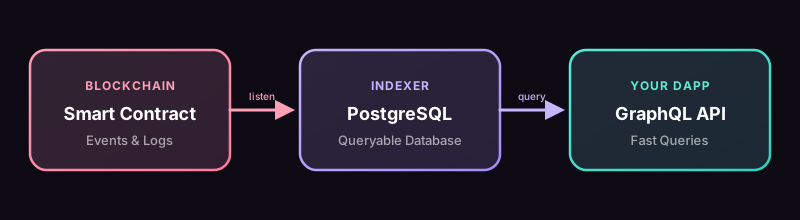
Your frontend queries the indexer instead of the chain. Fast and filterable.
The Graph vs Envio
I've used The Graph before. It's battle-tested, decentralized, and supports 80+ networks including Base (both mainnet and Sepolia). You write subgraphs in AssemblyScript.
I learned about Envio at an Encode Club hackathon. What caught my attention: it's TypeScript, not AssemblyScript. Auto-generates boilerplate from your contract. And their HyperSync technology claims up to 2000x faster indexing than standard RPC-based approaches.
| Feature | The Graph | Envio |
|---|---|---|
| Networks | 80+ (Base, Base Sepolia, Ethereum, Polygon, etc.) | EVM, SVM (Solana), and Fuel chains (Base, Base Sepolia, etc.) |
| Language | AssemblyScript | TypeScript |
| Multi-chain | Separate subgraphs per chain | Native multi-chain in one indexer |
| Decentralization | Decentralized network available | Hosted service only |
| Setup | Manual schema + mappings | Auto-generates from contract ABI |
| Speed | Standard RPC-based indexing | HyperSync (up to 2000x faster for EVM) |
Envio also supports Solana (SVM) indexing with its own dedicated documentation.
I went with Envio for Floe. TypeScript instead of AssemblyScript meant I could move faster. The auto-generation from the contract ABI saved setup time. And the HyperSync speed made a difference when I needed to re-index during development.
Building the Indexer
For Floe, I needed to index:
- Intents - lender offers, borrower requests
- Loans - when intents get matched, repaid, liquidated
- Markets - token pairs and their config
Step 1: Init
Envio's CLI generates everything from your contract address:
npx envio init
# Pick your network, paste contract address
# It pulls the ABI and generates the boilerplate
You get three files:
config.yaml- events to listen forschema.graphql- your database schemasrc/EventHandlers.ts- where your code goes
Step 2: Pick Your Events
In config.yaml, tell Envio which events to track:
name: floe-indexer
networks:
- id: 8453  # Base Mainnet
  start_block: 40499040
  contracts:
  - name: LendingIntentMatcher
    address: 0xYourContractAddress
    handler: src/EventHandlers.ts
    events:
    - event: LogLenderOfferPosted(address indexed lender, bytes32 indexed marketId, bytes32 offerHash)
    - event: LogBorrowerOfferPosted(address indexed borrower, bytes32 indexed marketId, bytes32 offerHash)
    - event: LogIntentsMatched(address indexed lender, address indexed borrower, address indexed matcher, bytes32 marketId, uint256 loanId)
    - event: LogLoanRepayment(uint256 indexed loanId, uint256 totalRepaid, uint256 protocolFee, uint256 collateralReturned)
    # ... more events
Step 3: Schema
Events don't give you everything. LogLenderOfferPosted only has the lender address, market ID, and offer hash. You still need amount, interest rate, duration, expiry.
The schema defines what you'll store:
type LenderIntent {
  id: ID!
  offerHash: String!
  lender: String!

  # Full intent details (fetched via RPC)
  amount: BigInt!
  minInterestRateBps: BigInt!
  maxLtvBps: BigInt!
  duration: BigInt!
  expiry: BigInt!

  # Computed at index time
  status: String!  # 'open' | 'matched' | 'cancelled' | 'expired' | 'partial'

  # Metadata
  blockTimestamp: BigInt!
  transactionHash: String!
}
Step 4: Write Handlers
When LogLenderOfferPosted fires:
- Fetch the full intent from the contract (you only have the hash)
- Figure out the status (open, matched, cancelled, expired, partial)
- Save it
LendingIntentMatcher.LogLenderOfferPosted.handler(async ({ event, context }) => {
  const offerHash = event.params.offerHash;

  // Fetch FULL intent details using Envio's Effect API
  const [intentData, isUsed] = await Promise.all([
    context.effect(getLendIntentDetails, offerHash),
    context.effect(checkIntentUsed, offerHash),
  ]);

  // Compute status at index time
  const status = computeIntentStatus(
    true, // isRegistered
    isUsed,
    intentData.expiry,
    BigInt(event.block.timestamp)
  );

  // Store the complete entity
  context.LenderIntent.set({
    id: `${event.chainId}_${offerHash}`,
    offerHash: offerHash,
    lender: intentData.lender,
    amount: intentData.amount,
    minInterestRateBps: intentData.minInterestRateBps,
    maxLtvBps: intentData.maxLtvBps,
    duration: intentData.duration,
    expiry: intentData.expiry,
    status: status,
    blockTimestamp: BigInt(event.block.timestamp),
    transactionHash: event.transaction.hash,
  });
});
Fetching Full Data: The Effect API
The event only has the hash. To get the full intent (amount, rate, duration, etc.), you need to call the contract.
Envio's Effect API handles this. It caches results, rate limits your RPC calls, and retries on failures. Without it, you'd hammer your RPC and probably get rate limited.
export const getLendIntentDetails = createEffect(
  {
    name: "getLendIntentDetails",
    input: S.string,  // offerHash
    output: { /* full intent schema */ },
    cache: true,  // Same input returns cached result without another RPC call
    rateLimit: { calls: 3, per: "second" }
  },
  async ({ input, context }) => {
    // Fetch from contract with retry + fallback RPC
    return withRetryAndFallback(
      () => primaryClient.read.getOnChainLendIntent([input]),
      () => fallbackClient?.read.getOnChainLendIntent([input]),
      "getLendIntent"
    );
  }
);
The cache: true flag is important. It means the same input returns the cached result without making another RPC call. For immutable data (like intent parameters that never change after registration), this avoids redundant calls when the same hash appears in multiple events.
The Full Stack
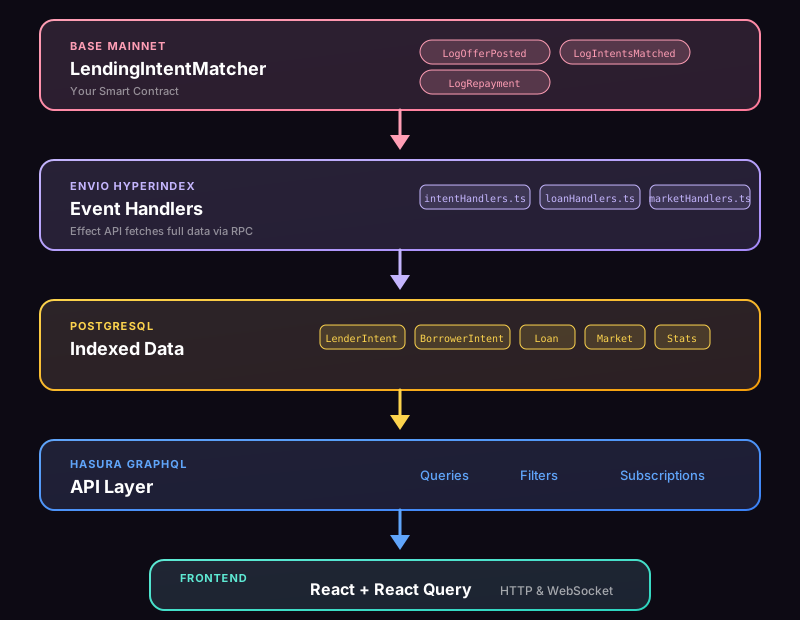
Here's what's running:
- Base Mainnet - where the contract lives
- Envio HyperIndex - listens to events, fetches full data, writes to PostgreSQL
- PostgreSQL - stores everything
- Hasura - generates a GraphQL API on top of PostgreSQL
- Frontend - queries via GraphQL
The frontend never talks to the blockchain for reads. Just GraphQL:
query GetOpenIntents($marketId: String!) {
  LenderIntent(
    where: { marketId: { _eq: $marketId }, status: { _eq: "open" } }
    order_by: { minInterestRateBps: asc }
  ) {
    id
    lender
    amount
    minInterestRateBps
    duration
    expiry
  }
}
Filtered, sorted, no RPC calls.
Refactoring: When EventHandlers.ts Hits 2000+ Lines
Envio generates a single EventHandlers.ts file for all your event handlers. Works great at first. Then you add more events. More handlers. More logic.
Mine hit 2000+ lines. Scrolling through a massive file to find the right handler got old fast. Adding new features meant searching through hundreds of lines to find where to add code.
I broke it down:
src/
├── handlers/
│   ├── intentHandlers.ts       # Lender/borrower intent events
│   ├── loanHandlers.ts          # Loan creation, repayment, liquidation
│   ├── marketHandlers.ts        # Market config updates
│   ├── matchHandlers.ts         # Intent matching logic
│   └── partialFillHandlers.ts   # Partial fill tracking
├── effects/
│   ├── intentEffects.ts         # RPC calls for intent data
│   ├── loanEffects.ts           # RPC calls for loan data
│   └── marketEffects.ts         # RPC calls for market data
├── utils/
│   ├── statusHelpers.ts         # Status computation logic
│   ├── statsHelpers.ts          # Stats update helpers
│   └── rpc.ts                   # RPC retry logic
├── contracts/
│   ├── abi.ts                   # Contract ABIs
│   └── clients.ts               # Viem clients
└── EventHandlers.ts             # Main file imports and registers handlers
The pattern:
- Handlers by domain (intents, loans, markets)
- Effects grouped by what they fetch
- Utils for shared logic (status computation, stats updates)
- Contracts for ABIs and RPC clients
- EventHandlers.ts becomes a thin import/export layer
Now when I need to update loan repayment logic, I open loanHandlers.ts. When I need to change how intent status is computed, I open statusHelpers.ts. Each file is 100-300 lines and focused on one thing.
Worth doing once your main file crosses ~500 lines.
Real-Time Updates: WebSockets
The indexer stores data in PostgreSQL. But how do you show real-time updates in the frontend? How do bots know when new intents are posted?
WebSockets. Specifically, Hasura's built-in WebSocket support for GraphQL subscriptions.
How It Works
The WebSocket server is part of the indexer infrastructure, not something you build separately. When you set up Envio, you get three services running together:
- Envio HyperIndex (processes blockchain events)
- PostgreSQL (stores indexed data)
- Hasura GraphQL Engine (provides WebSocket server automatically)
All three run via the docker-compose.yaml that Envio generates in your indexer directory.
The flow:
- Smart contract emits event
- Envio processes and writes to PostgreSQL
- Hasura detects the database change
- Hasura broadcasts update via WebSocket to all subscribers
- Clients receive the update (web app, solver bot, liquidation bot)
No polling, no delay.
You don't write WebSocket server code. Hasura handles it.
The Setup
The indexer's docker-compose.yaml (generated by Envio) runs three services:
services:
  envio-postgres:
    image: postgres:17.5
    ports:
      - "5433:5432"

  graphql-engine:
    image: hasura/graphql-engine:v2.43.0
    ports:
      - "8090:8080"
    depends_on:
      - envio-postgres
    environment:
      HASURA_GRAPHQL_DATABASE_URL: postgres://postgres:testing@envio-postgres:5432/envio-dev
      HASURA_GRAPHQL_ENABLED_LOG_TYPES: startup, http-log, websocket-log, query-log
      HASURA_GRAPHQL_ADMIN_SECRET: testing
      HASURA_GRAPHQL_UNAUTHORIZED_ROLE: public
When you run envio dev, all three services start:
- Envio indexes events and writes to PostgreSQL
- PostgreSQL stores the indexed data (port 5433)
- Hasura exposes GraphQL + WebSocket server (port 8090)
Port 8090 serves both HTTP (for queries/mutations) and WebSocket (for subscriptions). Same endpoint, different protocol (ws:// instead of http://).
The WebSocket server is built-in to Hasura. You didn't have to write any server code.
Web App Subscriptions
The frontend uses graphql-ws to subscribe to intent and loan updates.
Intent subscription:
subscription OnNewLenderIntent($marketId: String) {
  LenderIntent(
    where: {
      marketId: { _eq: $marketId }
      status: { _in: ["open", "partial"] }
    }
    order_by: { createdAt: desc }
    limit: 10
  ) {
    offerHash
    lender
    amount
    status
    filledAmount
    remainingAmount
  }
}
When a new lender intent is posted, the frontend receives it instantly. No refresh needed.
Loan subscription:
subscription OnLoanStatusChange($loanId: numeric!) {
  Loan(where: { loanId: { _eq: $loanId } }) {
    loanId
    status
    currentPrincipal
    repaid
    liquidated
  }
}
When a loan is repaid or liquidated, the UI updates immediately.
Client setup (apps/web/src/graphql/client.ts):
import { createClient } from 'graphql-ws';
import { buildAuthHeaders } from '@floe/shared';

// Configuration via env vars
const ENVIO_HTTP_URL = process.env.NEXT_PUBLIC_ENVIO_ENDPOINT
  || 'http://localhost:8090/v1/graphql';
const ENVIO_WS_URL = process.env.NEXT_PUBLIC_ENVIO_WS_URL
  || ENVIO_HTTP_URL.replace(/^http/, 'ws');
const HASURA_ADMIN_SECRET = process.env.NEXT_PUBLIC_HASURA_ADMIN_SECRET
  || 'testing';

const wsClient = createClient({
  url: ENVIO_WS_URL,
  connectionParams: () => ({
    headers: buildAuthHeaders({
      endpoint: ENVIO_HTTP_URL,
      adminSecret: HASURA_ADMIN_SECRET,
    })
  }),
  retryAttempts: 5,
  keepAlive: 30000  // 30s heartbeat
});
For production, set these env vars:
# Hosted Envio on indexer.dev.hyperindex.xyz
NEXT_PUBLIC_ENVIO_ENDPOINT=https://indexer.dev.hyperindex.xyz/your-project/v1/graphql
NEXT_PUBLIC_ENVIO_WS_URL=wss://indexer.dev.hyperindex.xyz/your-project/v1/graphql
NEXT_PUBLIC_HASURA_ADMIN_SECRET=your-secret
The URL auto-converts HTTP to WebSocket (http → ws, https → wss) if you don't specify ENVIO_WS_URL separately.
Bot Subscriptions
The solver bot and liquidation bot use the same WebSocket pattern and env var configuration.
Solver config (apps/solver/.env):
# Local
ENVIO_HTTP_ENDPOINT=http://localhost:8090/v1/graphql
ENVIO_WS_ENDPOINT=ws://localhost:8090/v1/graphql

# Production (Hosted Envio)
ENVIO_HTTP_ENDPOINT=https://indexer.dev.hyperindex.xyz/floe-base-mainnet/v1/graphql
ENVIO_WS_ENDPOINT=wss://indexer.dev.hyperindex.xyz/floe-base-mainnet/v1/graphql
Solver (apps/solver/src/services/ws-subscription-manager.ts) subscribes to all intent changes:
subscription OnLenderIntents {
  LenderIntent(order_by: { updatedAt: desc }) {
    offerHash
    status
    isRegistered
    isUsed
    amount
    filledAmount
  }
}
When it receives an update:
- Check if the status changed (track previous state in a
Map) - Skip if not
openorpartial - Skip if already used or not registered
- Add to matching queue
Liquidation bot (apps/liquidation-bot/src/services/ws-loan-subscription-manager.ts) subscribes to loan changes:
subscription OnLoans {
  Loan(
    where: {
      status: { _in: ["active", "overdue"] }
      repaid: { _eq: false }
      liquidated: { _eq: false }
    }
    order_by: { updatedAt: desc }
  ) {
    loanId
    status
    currentPrincipal
    collateralAmount
    endTime
  }
}
When a loan becomes overdue or nears liquidation threshold, the bot receives the update immediately and checks if it's profitable to liquidate.
Bootstrap Pattern
Bots follow a consistent pattern:
- HTTP fetch all existing data on startup (bootstrap)
- WebSocket subscribe for real-time updates
- Track seen items to avoid reprocessing
This ensures they don't miss anything between startup and subscription.
Why it matters: if you only subscribed, you'd miss anything that happened before the bot started. If you only polled, you'd have delays and waste RPC calls. Bootstrap + subscribe = complete and real-time.
The Gotcha: No Aggregates on Hosted Envio
Worked great locally. Deployed to Envio's hosted service. Failed.
Aggregate Queries
An aggregate query is when you ask the database to count or sum across rows:
- COUNT - "How many open intents?" →
12 - SUM - "Total value of active loans?" →
1,500,000 - AVG - "Average interest rate?" →
5.2
Perfect for dashboards. My frontend needed to show counts like "12 open lender intents."
Hasura supports this locally:
query GetIntentCounts($marketId: String!) {
  LenderIntent_aggregate(where: { marketId: { _eq: $marketId }, status: { _eq: "open" } }) {
    aggregate {
      count
    }
  }
}
On hosted? These endpoints don't exist.
Why
From Envio's docs:
"Aggregations over large datasets can be very slow and unpredictable in production. The recommended approach is to compute and store aggregates at indexing time, not at query time."
Running COUNT(*) on millions of rows every time someone loads the page would be slow.
The Fix: Pre-compute
Instead of counting when someone asks, count as events happen.
Like a librarian. Bad way: every time someone asks "how many mystery books?", count every book. Good way: keep a running count, +1 when a new mystery arrives, -1 when one leaves.
You need a stats entity:
type IntentStats {
  id: ID!                    # "global" or marketId
  marketId: String
  openLenderCount: Int!
  openBorrowerCount: Int!
  matchedLenderCount: Int!
  # ... more counts
  updatedAt: BigInt!
}
Every time an intent is created, matched, or cancelled, update the stats:
// In intentHandlers.ts
if (status === "open") {
  await updateIntentStats(
    context,
    marketId,
    { openLenderDelta: 1 },  // Increment open count
    BigInt(event.block.timestamp)
  );
}

// The helper function
async function updateIntentStats(
  context: any,
  marketId: string | null,
  deltas: { openLenderDelta?: number; matchedLenderDelta?: number; /* ... */ },
  timestamp: bigint
) {
  const id = marketId || "global";
  const existing = await context.IntentStats.get(id);

  context.IntentStats.set({
    id,
    marketId,
    openLenderCount: (existing?.openLenderCount || 0) + (deltas.openLenderDelta || 0),
    matchedLenderCount: (existing?.matchedLenderCount || 0) + (deltas.matchedLenderDelta || 0),
    // ... update all counts
    updatedAt: timestamp,
  });
}
Frontend just reads the number:
query GetStats($marketId: String!) {
  IntentStats(where: { marketId: { _eq: $marketId } }) {
    openLenderCount
    openBorrowerCount
  }
}
Why Compute Status Early?
Why not just store the expiry timestamp and let the frontend check if it's expired?
You could. But then you can't filter by status in your queries. You'd have to load all intents and filter client-side.
Do the work once (when indexing) instead of every time someone queries.
function computeIntentStatus(
  isRegistered: boolean,
  isUsed: boolean,
  expiry: bigint,
  currentTimestamp: bigint,
  filledAmount?: bigint,
  totalAmount?: bigint
): string {
  // Priority order matters: matched > cancelled > expired > partial > open
  if (isUsed) return 'matched';
  if (!isRegistered) return 'cancelled';
  if (currentTimestamp > expiry) return 'expired';
  if (filledAmount && totalAmount && filledAmount > 0n && filledAmount < totalAmount) {
    return 'partial';
  }
  return 'open';
}
When You Need an Indexer
You'll know you need one when you try to build a real frontend.
If you're just reading current state from a contract (like "what's the owner address?"), you can query the contract directly. No indexer needed.
But the moment you need historical data, filtering, sorting, or aggregation, you're stuck. Blockchains can't do "show me all loans created last week" or "filter by interest rate" or "count how many active positions I have." That requires an indexer.
The other sign: you're hitting RPC rate limits. If you're making hundreds of getLogs or readContract calls to display a single page, you need an indexer. Your RPC provider will throttle you, and your users will wait 10+ seconds for data.
Takeaways
Blockchains aren't databases. You can't query them like one. You need something in between that listens to events, stores structured data, and lets you run normal queries. That's what indexers do.
The Graph vs Envio isn't just about speed. The Graph is decentralized and battle-tested. Envio is faster to develop with (TypeScript, not AssemblyScript) and has better DX. Pick based on what you value more: decentralization or velocity.
Hosted Envio has no aggregate queries. If you need counts, sums, or averages, pre-compute them when indexing. Don't try to use Hasura's _aggregate queries in production. They'll fail. Compute once, store it, query it.
Compute derived fields early. Status, counts, boolean flags - calculate these when you're processing events, not when the frontend queries. It's faster and avoids complex logic in your queries.
Use the Effect API. It fetches full contract data, batches reads, handles retries, and keeps your handlers clean.